
How Families Can Block Inappropriate Websites on All Devices
Discover effective tools and strategies to block inappropriate websites and keep your family's devices safe online.
NATIONWIDE - DECEMBER 2025 - (USAnews.com) When you consider the sheer volume of information and entertainment available online, it is easy to feel overwhelmed. Your children, in particular, face a digital landscape that is constantly evolving, presenting both educational opportunities and potential risks. The open nature of the internet means that alongside valuable resources, there are also websites and content that are entirely unsuitable for younger eyes, or even for certain family preferences.
Ensuring a safe online environment for everyone in your household requires proactive steps, moving beyond simple conversations about internet safety. It involves understanding and implementing the tools available to filter out unwanted material.
Let’s take a closer look at practical strategies for blocking inappropriate websites across all your family's devices.
Continuous Monitoring and Open Communication
While technological solutions are vital, they are never a complete substitute for ongoing vigilance and open dialogue. No blocking system is foolproof, and new content emerges constantly. Regularly checking device usage, reviewing browser histories, and understanding the apps your children are using are important complementary steps.
As David Manoukian, CEO & Founder, Kibosh.com, shares, “With the variety of devices children use today, a single filter is rarely enough. Introducing Kibosh 3.0, at last a sustainable, plug-n-play solution that gives parents the ability to control access to inappropriate websites seamlessly across smartphones, tablets, laptops, and even smart TVs. By centralizing controls through a family-safe router or unified parental control platform, parents gain consistent protection without constant manual intervention. The key is combining technology with ongoing awareness — tools plus education create safe digital habits.”
More importantly, fostering an environment where your children feel comfortable discussing what they encounter online, both good and bad, is perhaps the most effective long-term strategy for digital safety. The goal is not just to restrict access, but to educate and help your family to make responsible choices when navigating the vast digital world.
Leveraging Router-Level Filtering
The network router, often a small box tucked away in a corner, is the gateway to the internet for every device in your home. This makes it an ideal point to implement content filtering for all connected devices. Many modern routers come equipped with built-in parental control features.
Accessing these usually involves logging into your router's administration interface through a web browser. Once there, you can typically find settings for website blocking or content filtering. Some routers allow you to block specific URLs, while others offer more strong features like category-based blocking (e.g., adult content, gambling, violence) or scheduling internet access.
The main advantage of router-level filtering is its universality. Once configured, it applies to every device connected to your home Wi-Fi network, whether it's a smartphone, tablet, laptop, or smart TV. This means you only need to set it up once for broad protection. However, its effectiveness is limited to your home network. If a device leaves your home Wi-Fi, these protections no longer apply. Also, the sophistication of these controls varies greatly among router models, so your experience may differ depending on your hardware.
According to a global 2023 survey, about half of internet users report using parental‑control tools in some form.
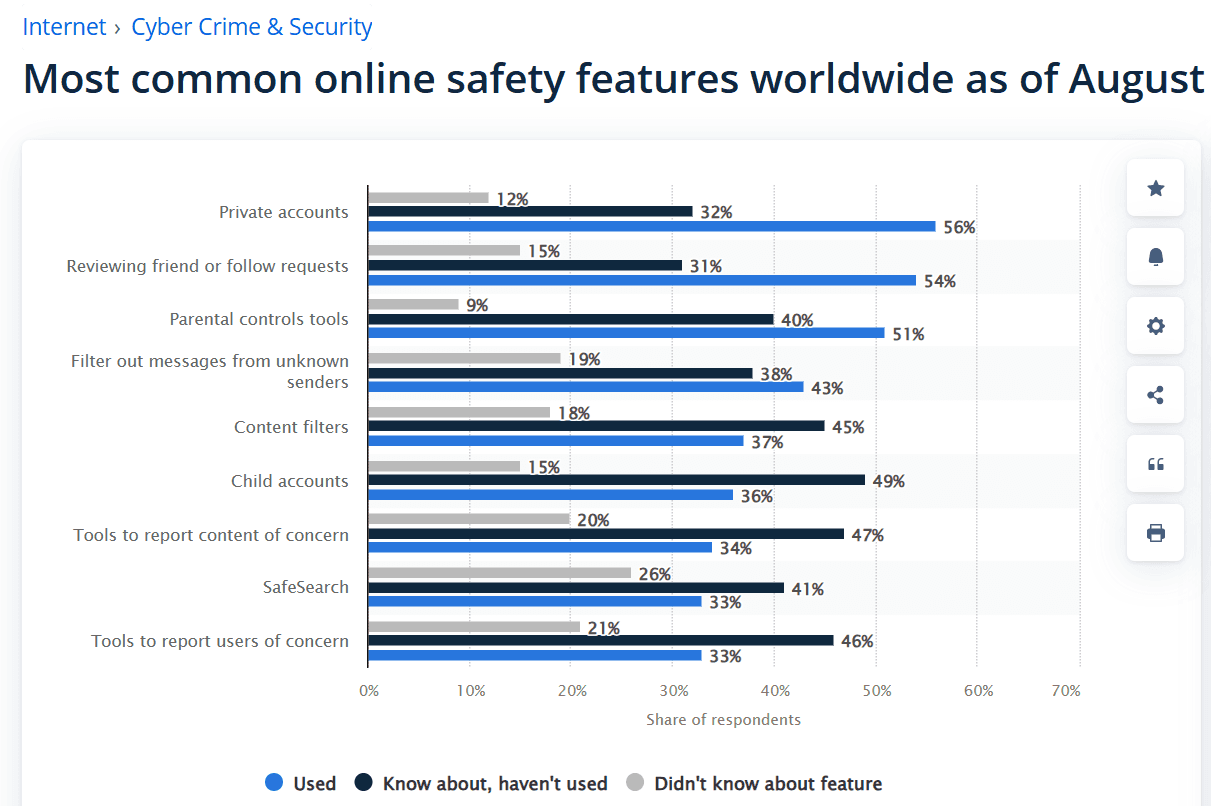
Source: Statistica
Using Domain Name System (DNS) Filtering Services
DNS filtering offers another layer of protection that can complement or even replace router-level controls. When you type a website address into your browser, your device uses a DNS server to translate that human-readable address into an IP address – a numerical code that computers use to find each other.
By using a DNS service that filters content, you can block access to inappropriate websites before your device even connects to them. Services like OpenDNS FamilyShield are popular choices, offering pre-configured filters that automatically block domains associated with adult content, illegal activities, and phishing attempts.
Setting up DNS filtering involves changing the DNS server settings on your router. This way, every device on your network will use the filtered DNS. Alternatively, you can configure individual devices to use these DNS servers, which is useful for laptops or tablets that might connect to different networks.
The primary benefit here is the intelligence behind these services; they maintain vast databases of inappropriate sites and update them regularly. While effective for known problematic sites, highly obscure or newly emerging unwanted content might occasionally slip through.
Implementing Software-Based Parental Control Solutions
For more granular control and features beyond simple content blocking, dedicated parental control software is an excellent option. These applications are installed directly onto individual devices, such as your children's laptops, tablets, and smartphones.
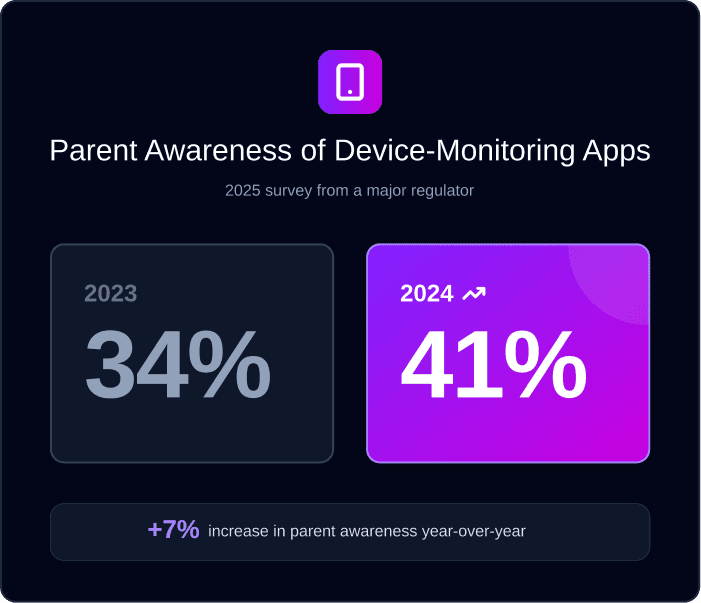
Awareness of device‑monitoring apps is steadily increasing among parents. A 2025 survey found that parent familiarity with these tools rose from 34% in 2023 to 41% in 2024, reflecting growing concern over online safety and the need for proactive digital oversight.
They offer a rich suite of features, including website blocking, application blocking, time limits for screen use, monitoring of online activity, and even location tracking. Many popular internet security suites now include strong parental control modules.
The strength of software-based solutions lies in their comprehensive nature and their ability to follow the device wherever it goes. Unlike router or DNS filtering, these applications provide protection even when a device is connected to public Wi-Fi or cellular data. They often allow for custom profiles for each child, with age-appropriate settings.
However, you need to install and configure these on every device you wish to protect, and they usually come with an annual subscription cost. Some tech-savvy children may also find ways to bypass these controls if they are not configured securely.
Utilizing Browser Extensions and Built-in Browser Controls
Web browsers themselves offer some basic content filtering capabilities, primarily through extensions or built-in settings. Most major browsers, like Chrome, Firefox, and Edge, have "safe search" options that filter explicit results from search engines.
This is a good first step, especially for ensuring search queries yield appropriate results. Beyond safe search, browser extensions can provide more active blocking. You can find extensions designed specifically for parental control, allowing you to block websites, prevent pop-ups, or even enforce time limits within the browser.
The ease of installation and typically free nature of many browser extensions make them accessible. They are effective for the specific browser they are installed on.
However, their main limitation is that they only protect activity within that particular browser. If your child uses a different browser or an app that accesses the internet directly (not through a web browser), these extensions will not offer protection. Furthermore, extensions can often be disabled or uninstalled by someone with sufficient permissions or technical know-how.
Operating System Level Restrictions
Modern operating systems, both desktop and mobile, offer an increasing array of built-in parental control features. Windows, macOS, Android, and iOS all include settings that allow parents to restrict content, manage app installations, and set usage limits.
For instance, Apple's Screen Time on iOS and macOS allows you to block specific apps, filter web content, and restrict purchases. Google's Family Link for Android provides similar functionalities, enabling parents to manage their children's app usage, set screen time limits, and approve or block app downloads.
These operating system level controls are powerful because they integrate deeply with the device's core functions. They protect against inappropriate content not just in browsers but often within apps as well. They are especially useful for ensuring that app downloads are appropriate and that screen time is managed effectively.
Setting them up requires access to each device and an understanding of its specific settings. Maintaining these settings across multiple devices and operating systems can sometimes be complex, but their comprehensive control often justifies the effort.
Wrap Up
Establishing clear rules about internet use, explaining the rationale behind those rules, and ensuring your children understand the potential dangers online will provide a stronger foundation for their digital well-being than any filtering technology alone. Maintaining trust and communication ensures that technology acts as a tool to support, rather than replace, parental guidance. Equipping your family with both the technical safeguards and the knowledge to use the internet wisely is the most strong form of protection you can provide.